
Apple Lockdown Mode: Why No Users Have Been Hacked by Spyware
Lockdown Mode on iPhone — What It Really Does to Safari (Maximum Security Explained)
Key Points:
Lockdown Mode has successfully prevented all known spyware attacks on Apple devices.
The feature is designed for high-risk users like journalists, activists, and lawyers.
It limits device features to dramatically reduce digital attack surfaces.
advertisement
Introduction
Apple has once again confirmed that its Lockdown Mode is keeping users safe from spyware. Nearly four years after its 2022 debut, the company reports that no devices with Lockdown Mode enabled have been successfully hacked by mercenary spyware. This milestone underscores Apple’s ongoing commitment to digital security and protecting users from sophisticated attacks, including those from government-level spyware developers like NSO Group and Intellexa.
Lockdown Mode is an opt-in security feature available on iPhone, iPad, and Mac devices. By restricting common pathways exploited by spyware, it provides an “extreme” level of protection for users who are potentially at high risk of cyberattacks.
How Lockdown Mode Protects Apple Users
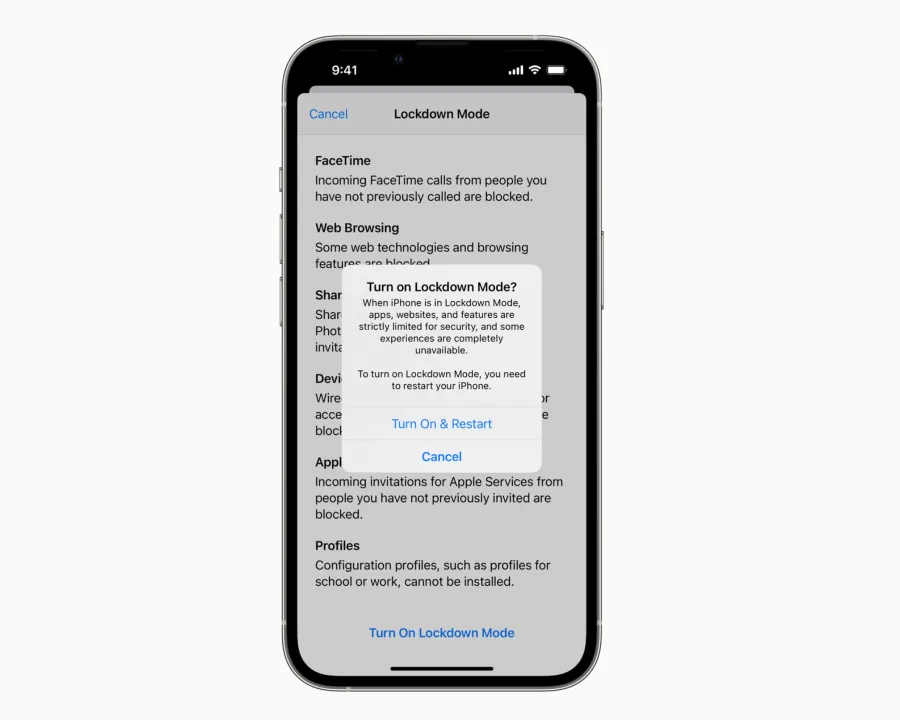
Image Credits: Apple
When enabled, Lockdown Mode significantly reduces exposure to cyber threats by disabling or limiting features that spyware commonly exploits. Key protections include:
Messages App Restrictions: Most attachments other than images are blocked; link previews are disabled.
FaceTime and Invitations: Incoming calls and invites from unknown contacts are blocked.
Web Browsing Safeguards: Complex web technologies, such as just-in-time JavaScript compilation, are disabled unless a trusted site is added as an exception.
Photos and Shared Content: Shared albums are removed, and new invitations are blocked.
Device Connectivity Limits: Wired connections with accessories are blocked when the device is locked.
Configuration Restrictions: Installation of configuration profiles and enrollment into mobile device management (MDM) are disabled.
Network Protocol Limitations: Certain network services are restricted to minimize attack vectors.
These protections dramatically shrink the “attack surface,” making it extremely difficult for spyware to infiltrate devices remotely, even with sophisticated zero-click exploits.
Real-World Impact and Expert Opinions
According to Apple, they are unaware of any successful mercenary spyware attacks against Lockdown Mode-enabled devices. Amnesty International’s security lab head, Donncha Ó Cearbhaill, confirmed that his team has not seen any iPhones compromised while Lockdown Mode was active.
Digital rights organizations, including the University of Toronto’s Citizen Lab, have documented numerous successful spyware attacks on Apple devices. Yet, none of these involved bypassing Lockdown Mode. In fact, Citizen Lab researchers have seen Lockdown Mode actively block attacks from NSO Group’s Pegasus spyware and Predator spyware by Intellexa.
Google security researchers also noted that some spyware will automatically abort its attack if Lockdown Mode is detected, suggesting that the mode itself can deter malicious software by making detection too risky for attackers.
Patrick Wardle, an Apple cybersecurity expert, praises Lockdown Mode as “one of the most aggressive consumer-facing hardening features ever shipped,” highlighting its importance in making spyware attacks more expensive and complex for adversaries.
How to Enable Lockdown Mode
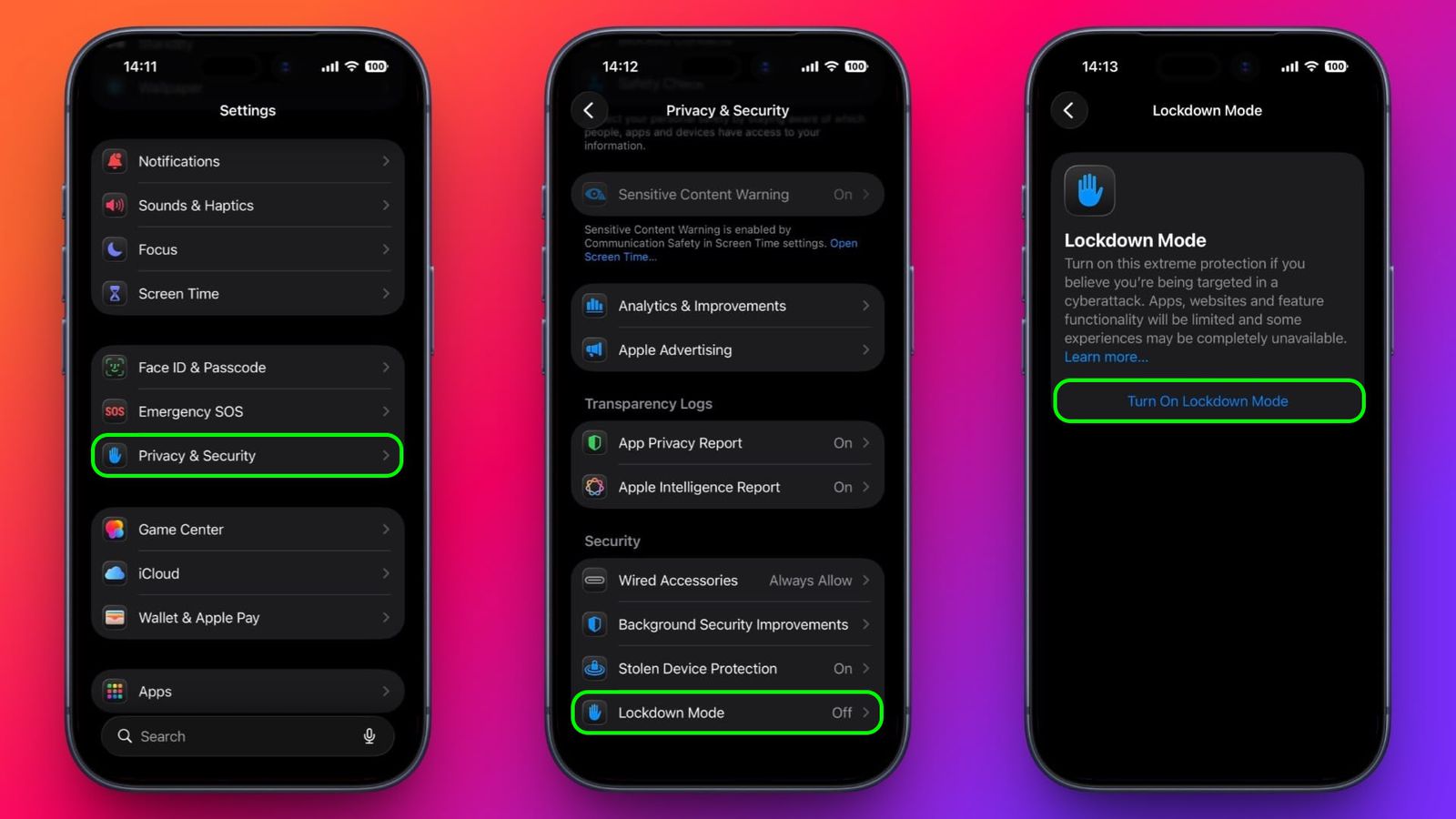
How to Enable Lockdown Mode on iPhone and iPad
image source: macrumors.com
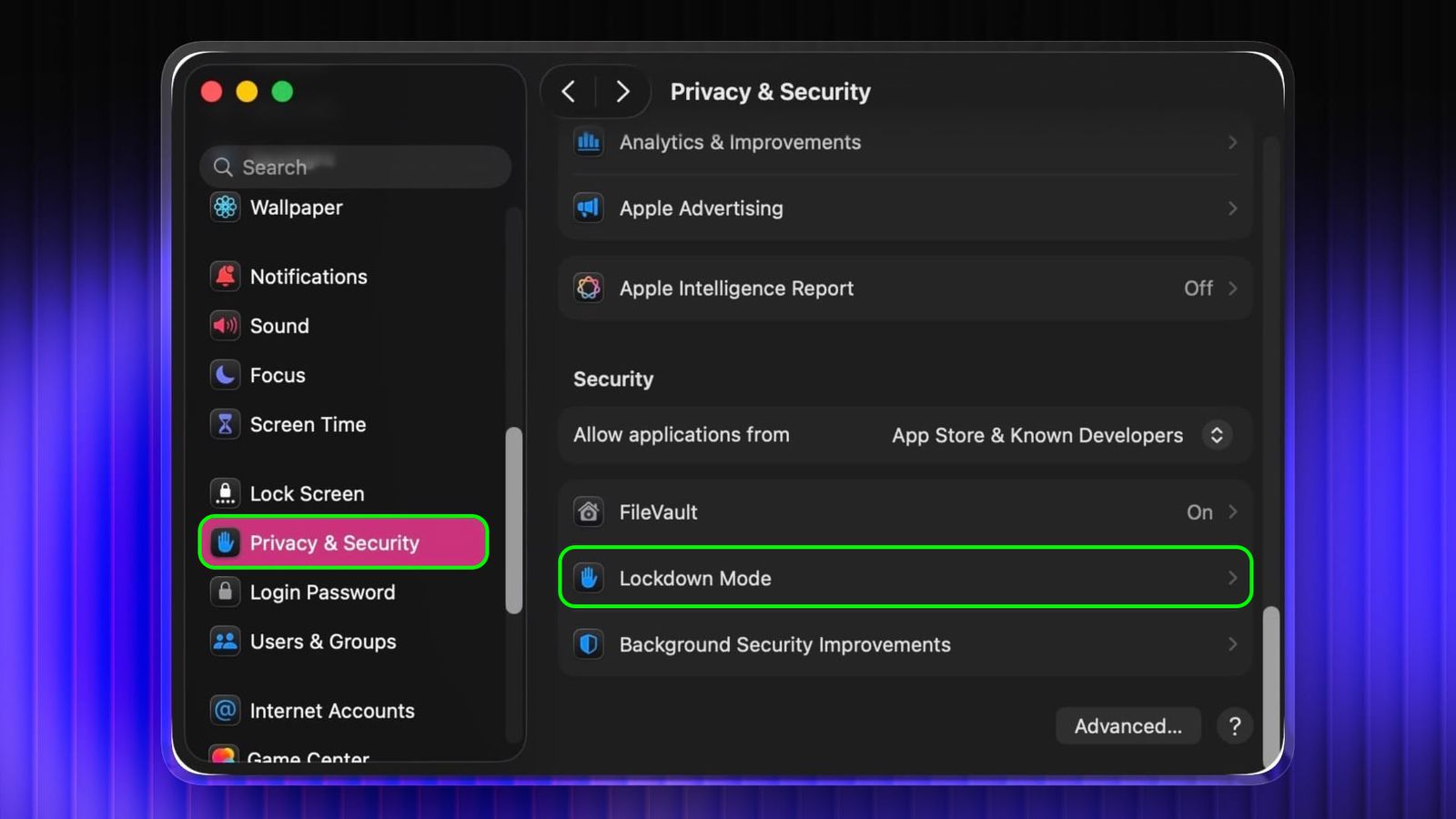
How to Enable Lockdown Mode on Mac
image source: macrumors.com
For users who want maximum protection, Lockdown Mode can be easily activated:
On iPhone and iPad:
Open the Settings app.
Navigate to Privacy & Security → Lockdown Mode.
Tap Turn On Lockdown Mode, review restrictions, and select Turn On & Restart.
On Mac:
Open System Settings → Privacy & Security → Lockdown Mode.
Click Turn On Lockdown Mode, review protections, and select Turn On & Restart.
Apple allows users to configure exceptions for websites and certain apps while Lockdown Mode is active, ensuring necessary functionality without compromising security.
Conclusion
Apple’s Lockdown Mode is a game-changer in personal cybersecurity. For individuals at high risk of targeted attacks, this feature is more than just a security setting—it’s a shield against sophisticated spyware that could compromise privacy, reputation, or even personal safety. With Lockdown Mode, users gain peace of mind, knowing that their devices are protected against some of the most advanced digital threats in the world.
As cyber threats continue to evolve, Apple’s commitment to proactive defense illustrates the importance of combining technology with awareness. Enabling Lockdown Mode is a practical step toward taking control of digital safety in an increasingly connected world.
Key Points Summary
Lockdown Mode prevents spyware attacks by restricting vulnerable features on iPhone, iPad, and Mac.
No known Lockdown Mode-enabled devices have been compromised by mercenary spyware.
Experts from Amnesty International, Citizen Lab, and Google validate the effectiveness of the feature.
Suitable for journalists, activists, lawyers, and anyone seeking enhanced digital security.
Users can enable it easily and configure exceptions for trusted apps and websites.
advertisement
Frequently Asked Questions (FAQ)
1. What is Lockdown Mode?
Lockdown Mode is an optional Apple security feature that blocks features commonly exploited by spyware, providing an “extreme” level of protection.
2. Who should use Lockdown Mode?
It is aimed at high-risk users like journalists, activists, lawyers, government employees, or anyone worried about advanced digital threats.
3. Can Lockdown Mode be bypassed?
So far, no publicly documented spyware attacks have successfully bypassed Lockdown Mode. Experts affirm its effectiveness against known spyware like Pegasus and Predator.
4. Will Lockdown Mode affect normal device use?
Some functions, such as certain message attachments, web technologies, and device connections, are limited. Users can configure exceptions for trusted apps and websites.
5. How do I enable Lockdown Mode?
On iPhone/iPad: Settings → Privacy & Security → Lockdown Mode → Turn On & Restart.
On Mac: System Settings → Privacy & Security → Lockdown Mode → Turn On & Restart.
6. Can I disable Lockdown Mode?
Yes. Simply navigate back to Lockdown Mode settings and toggle it off. The device will restart.
Sources
TechCrunch – Apple confirms no Lockdown Mode users have been hacked
https://techcrunch.com/2026/03/27/apple-says-no-one-using-lockdown-mode-has-been-hacked-with-spyware/MacRumors – No iPhone in Lockdown Mode has ever been hacked
https://www.macrumors.com/2026/03/27/no-iphone-in-lockdown-mode-has-ever-been-hacked/MacRumors – How to enable Lockdown Mode on iOS and Mac
https://www.macrumors.com/how-to/enable-lockdown-mode-ios-mac/
Thank you !